How to build WDLs
Summary
This is Lesson 3 of the JAWS tutorial series. In Lesson 1 you ran the BLAST workflow as plain bash. In Lesson 2 you packaged the same commands into a Docker image. This lesson wraps those containerized commands into a WDL workflow that Cromwell (and JAWS) can execute.
Three terms to keep straight:
WDL (Workflow Description Language) is what you write. It describes which commands to run, in what order, what inputs each step takes, and what outputs it produces.
Cromwell is the engine that executes WDL workflows. JAWS uses Cromwell internally; you can also run Cromwell directly on your laptop while developing.
A task is one unit of work (one
runtime { docker: ... }block, one command). A workflow strings tasks together.
By the end of this lesson you’ll have a single blast.wdl file with three tasks, make_db, run_blast, and summarize, that runs the same workflow end-to-end inside containers, plus a visual DAG of how the tasks connect.
Pre-requisites
Completed Lesson 1: Local Development Environment and Lesson 2: Docker Containers.
You have the
jaws-tutorial-examplesrepo cloned and theblast_example/Docker image either built locally or available on Docker Hub.JAWS uses WDL 1.0. The WDL examples in this tutorial are all 1.0-compliant. WDL 1.1 syntax will not parse with the Cromwell version JAWS ships.
A few useful references for later:
The official OpenWDL 1.0 Specification
Re-usable subworkflow tasks: wdl-tasks
The Big Picture
The BLAST workflow you ran in Lessons 1 and 2 has three steps:
# 1. Build a BLAST database from the reference FASTA
makeblastdb -in reference.fasta -dbtype nucl -out blastdb/ref

# 2. Search the query FASTA against that database
blastn -query query.fasta -db blastdb/ref -outfmt 6 -out hits.tsv

# 3. Summarize: how many queries got at least one hit?
nqueries=$(grep -c '^>' query.fasta)
nhits=$(awk '{print $1}' hits.tsv | sort -u | wc -l)
echo "$nhits of $nqueries query sequences had at least one BLAST hit."
Each step becomes one WDL task. The output of one task becomes the input of the next, that’s how Cromwell figures out the order to run them in.
A WDL task has four sections:
task task_name {
    input { ... }       # Files and parameters the task needs
    command <<< ... >>> # The bash commands that actually do the work
    output { ... }      # Files the task produces (made available to later tasks)
    runtime { ... }     # Docker image, CPU, memory, time limit
}
The runtime block is where Lesson 2’s Docker image gets used. You wrote docker run --volume ... <image> blast.sh ... by hand in Lesson 2; the WDL runtime { docker: ... } block does the equivalent automatically for every task, with Cromwell choosing Docker, Apptainer, or Shifter depending on the site.
Why this WDL doesn’t use the image you built in Lesson 2
The tasks below use docker: "ncbi/blast:latest", the official BLAST image that NCBI publishes on Docker Hub. NCBI already maintains a public, well-maintained image with makeblastdb and blastn installed, so there’s no reason for our workflow to depend on a one-off image we built ourselves.
The image you built and pushed in Lesson 2 was a learning exercise: every JAWS user needs to know how to package a tool that doesn’t already have a community-maintained image. Before you build your own, take a moment to check whether the third-party tool you want to run already has an official or community-maintained image on Docker Hub or Quay.io. If a well-maintained image exists, point your WDL’s runtime { docker: ... } at it and skip the build entirely. Build your own when no good image exists, when you need a specific tool combination, or when you need to bundle a custom script alongside the tool.
Task 1: make_db
The first task builds the BLAST database from a reference FASTA. It takes one input file and emits the resulting database files (multiple files share a prefix, so we collect them with glob).
task make_db {
    input {
        File reference_fasta
    }

    command <<<
        mkdir -p blastdb
        makeblastdb \
            -in ~{reference_fasta} \
            -dbtype nucl \
            -out blastdb/ref
    >>>

    output {
        Array[File] blast_db_files = glob("blastdb/ref.*")
    }

    runtime {
        docker: "ncbi/blast:latest"
        cpu: 1
        memory: "1 GB"
        runtime_minutes: 5
    }
}
Three things to notice:
~{reference_fasta}is how you interpolate a WDL variable into the command. The older${reference_fasta}syntax also works, but~{}is preferred because${}collides with bash variable expansion and produces hard-to-diagnose bugs.Array[File]plusglob(...)is the standard pattern for “this task produces several files I don’t know the exact names of.”makeblastdbemitsref.nhr,ref.nin,ref.nsq, and a few more,glob("blastdb/ref.*")collects them all into one list.The
runtimeblock points at the publicncbi/blast:latestimage on Docker Hub. JAWS pulls this image automatically on whichever compute site the task lands.
Hint
The command body can be wrapped in either curly braces { ... } or triple angle braces <<< ... >>>. The two differ in how they handle bash variable interpolation:
Command body style |
Placeholder syntax |
|---|---|
|
|
|
|
Prefer <<< ... >>> plus ~{}. It removes the ambiguity between WDL variables and bash variables, and is what every example in this lesson uses.
Task 2: run_blast
The second task searches the query FASTA against the database. Two new pieces appear: the task takes an Array[File] input (the database files from make_db), and the command has a small bit of setup to put those files back into one directory.
task run_blast {
    input {
        File query_fasta
        Array[File] blast_db_files
    }

    command <<<
        # Cromwell stages each input file into its own directory.
        # blastn needs all the database files in one place to find them
        # with a single -db prefix, so we copy them into blastdb/.
        mkdir -p blastdb
        for f in ~{sep=' ' blast_db_files}; do
            cp "$f" blastdb/
        done

        blastn \
            -query ~{query_fasta} \
            -db blastdb/ref \
            -outfmt 6 \
            -out hits.tsv

        # Always produce hits.tsv, even if there were no hits, so the
        # downstream task has a file to read.
        touch hits.tsv
    >>>

    output {
        File hits_tsv = "hits.tsv"
    }

    runtime {
        docker: "ncbi/blast:latest"
        cpu: 1
        memory: "1 GB"
        runtime_minutes: 5
    }
}
The ~{sep=' ' blast_db_files} syntax expands an array into a space-separated string, which is what bash for loops expect.
Why does Cromwell stage each file in its own directory? 🔗
Cromwell’s default file localization strategy puts each input File into a separate subdirectory of the task’s working directory. That keeps file names unique across inputs (two different inputs can both be called reads.fastq without colliding), but it also means a multi-file output from one task arrives at the next task as a list of paths, not as a directory.
Most of the time you don’t notice. The places it bites you:
Tools like
blastn,bwa, andsamtoolsthat expect a family of files sharing a prefix (ref.nhr,ref.nin,ref.nsq, …). The fix is themkdir + cppattern shown above, or symlinks (ln -s) if you’d rather not duplicate data.Tools that hard-code looking for sidecar files (e.g.
.bainext to a.bam). Same fix.
If your task ever errors out with “couldn’t find X.idx” or similar, this is almost always why.
Task 3: summarize
The third task reads the hits table and writes a one-line summary. It doesn’t need BLAST, so it uses a lighter base image:
task summarize {
    input {
        File hits_tsv
        File query_fasta
    }

    command <<<
        # `xargs` collapses leading whitespace that BSD `wc` adds on macOS.
        # Harmless on GNU/Linux where `wc` doesn't pad.
        nqueries=$(grep -c '^>' ~{query_fasta} | xargs)
        nhits=$(awk '{print $1}' ~{hits_tsv} | sort -u | wc -l | xargs)
        echo "$nhits of $nqueries query sequences had at least one BLAST hit." > summary.txt
        cat summary.txt
    >>>

    output {
        File summary_txt = "summary.txt"
    }

    runtime {
        docker: "ubuntu:22.04"
        cpu: 1
        memory: "512 MB"
        runtime_minutes: 5
    }
}
Two things worth noticing:
A task can use a different Docker image from the rest of the workflow.
summarizeonly needsgrep,awk,sort, andwc, all of which ship with stock Ubuntu, so there’s no reason to drag in the ~1 GB BLAST image for this step.The
set -eo pipefailidiom is also worth knowing forcommandblocks that use pipes. Without it, a failure in the middle of a pipeline is silently swallowed (the exit code of the last command wins), which makes debugging much harder. We omitted it here for readability, but in production workflows it’s a good default.
Workflow Definition
Now you connect the three tasks. The workflow block lists the inputs the workflow takes, then calls each task and wires outputs to inputs.
version 1.0

workflow blast_example {
    input {
        File reference_fasta
        File query_fasta
    }

    call make_db {
        input:
            reference_fasta = reference_fasta
    }

    call run_blast {
        input:
            query_fasta = query_fasta,
            blast_db_files = make_db.blast_db_files
    }

    call summarize {
        input:
            hits_tsv = run_blast.hits_tsv,
            query_fasta = query_fasta
    }

    output {
        File hits_tsv = run_blast.hits_tsv
        File summary_txt = summarize.summary_txt
    }
}
The wiring is in the input: lines of each call:
make_db.blast_db_filesrefers to the outputblast_db_filesof themake_dbtask. This is how Cromwell figures out thatrun_blastdepends onmake_dband must wait for it.run_blast.hits_tsvplugs intosummarize. Same idea.
Cromwell builds the dependency graph from these references. Tasks with no data dependency on each other run in parallel automatically, you don’t have to ask for it.
Note
Tasks are defined outside the workflow block; call statements live inside it. WDL lets you put the tasks before or after the workflow block; for readability, this tutorial puts the workflow first.
Note
The very first line, version 1.0, is required (see the prerequisites note on WDL 1.0).
Putting It All Together
Combine the workflow block and the three tasks into a single file, blast.wdl:
version 1.0

workflow blast_example {
    input {
        File reference_fasta
        File query_fasta
    }

    call make_db {
        input:
            reference_fasta = reference_fasta
    }

    call run_blast {
        input:
            query_fasta = query_fasta,
            blast_db_files = make_db.blast_db_files
    }

    call summarize {
        input:
            hits_tsv = run_blast.hits_tsv,
            query_fasta = query_fasta
    }

    output {
        File hits_tsv = run_blast.hits_tsv
        File summary_txt = summarize.summary_txt
    }
}

task make_db {
    input {
        File reference_fasta
    }

    command <<<
        mkdir -p blastdb
        makeblastdb \
            -in ~{reference_fasta} \
            -dbtype nucl \
            -out blastdb/ref
    >>>

    output {
        Array[File] blast_db_files = glob("blastdb/ref.*")
    }

    runtime {
        docker: "ncbi/blast:latest"
        cpu: 1
        memory: "1 GB"
        runtime_minutes: 5
    }
}

task run_blast {
    input {
        File query_fasta
        Array[File] blast_db_files
    }

    command <<<
        mkdir -p blastdb
        for f in ~{sep=' ' blast_db_files}; do
            cp "$f" blastdb/
        done

        blastn \
            -query ~{query_fasta} \
            -db blastdb/ref \
            -outfmt 6 \
            -out hits.tsv

        touch hits.tsv
    >>>

    output {
        File hits_tsv = "hits.tsv"
    }

    runtime {
        docker: "ncbi/blast:latest"
        cpu: 1
        memory: "1 GB"
        runtime_minutes: 5
    }
}

task summarize {
    input {
        File hits_tsv
        File query_fasta
    }

    command <<<
        nqueries=$(grep -c '^>' ~{query_fasta} | xargs)
        nhits=$(awk '{print $1}' ~{hits_tsv} | sort -u | wc -l | xargs)
        echo "$nhits of $nqueries query sequences had at least one BLAST hit." > summary.txt
        cat summary.txt
    >>>

    output {
        File summary_txt = "summary.txt"
    }

    runtime {
        docker: "ubuntu:22.04"
        cpu: 1
        memory: "512 MB"
        runtime_minutes: 5
    }
}
The complete file is also already in the example repo at jaws-tutorial-examples/blast_example/blast.wdl if you’d rather diff against it than retype.
Validate
Before running the workflow, check it parses cleanly. There are two validators you’ll use at different stages.
Validate locally with miniwdl check
While you’re iterating on the WDL on your laptop, the fastest feedback loop is miniwdl, an independent WDL parser. It’s a single pip install and reports syntax and basic type errors in well under a second.
pip install miniwdl
miniwdl check blast.wdl
A clean run prints something like SUCCESS plus a brief summary of the workflow’s inputs, calls, and outputs. Any syntax error is reported with a file and line number.
Validate against JAWS with jaws validate
Before you submit a workflow to JAWS, run jaws validate. This uses the same WDL parser JAWS will use to actually run the workflow, so it catches issues that miniwdl might miss (typically ones related to specific Cromwell-version quirks).
# On Dori, after activating the JAWS environment
module load jaws
jaws validate blast.wdl
# Workflow is OK
If miniwdl is happy and jaws validate complains, the failure is almost always a WDL 1.1 feature creeping into your file (Cromwell ships with 1.0). Common culprits: struct definitions, hints blocks, or the input { File? optional_file = None } syntax.
miniwdl check succeeds but jaws validate fails 🔗
The most common cause is WDL 1.1 syntax sneaking into a file declared version 1.0. miniwdl is lenient and parses several 1.1 constructs even in 1.0 files; the Cromwell version JAWS uses is stricter.
Things to check:
No ``struct`` definitions.
structis 1.1-only. Use a small number of typed inputs instead, or pass them as aMap[String, String](1.0 supports that).No ``hints { … }`` block. That’s 1.1. Put cache/runtime hints in the
runtimeblock in 1.0.Optional inputs use ``File?`` syntax, not ``File? = None``. The
= Nonedefault is 1.1.No ``input { Directory dir }`` type.
Directoryis 1.1. UseArray[File]withglobinstead.
If you’ve ruled all of those out and jaws validate still fails, paste the error in #jaws on Slack with the WDL attached. Real Cromwell bugs do happen; the team is happy to look.
Execute Locally
You can run Cromwell directly on your laptop to make sure the WDL works end-to-end before submitting it to JAWS. This requires Docker (Lesson 2), a Java runtime (Cromwell is a JAR file), and a copy of Cromwell itself.
If you don’t already have Java, install a current LTS — OpenJDK 17 or 21 both work with Cromwell 87. The simplest paths:
# macOS (Homebrew)
brew install openjdk@17

# Ubuntu / Debian
sudo apt install openjdk-17-jre

# Verify
java -version
JAWS ships Cromwell 87, so use that version locally too. Mismatched Cromwell versions are a common source of “works on my laptop, fails on JAWS” bugs.
# Grab the matching Cromwell jar (one-time)
wget https://github.com/broadinstitute/cromwell/releases/download/87/cromwell-87.jar

# Run from inside blast_example/ so the relative paths in inputs.json resolve
cd jaws-tutorial-examples/blast_example
java -jar /path/to/cromwell-87.jar run blast.wdl -i inputs.json
You’ll see Cromwell start each task, pull the ncbi/blast and ubuntu images on the first run (subsequent runs reuse them), and finish with a JSON block listing the workflow outputs.
The output files live under cromwell-executions/blast_example/<workflow-id>/call-<task_name>/execution/. Each task gets its own directory containing stdout, stderr, script, and any files it produced. When something fails, stderr is the first thing to read.
Note
inputs.json is the file that tells Cromwell which files to feed into the workflow. It’s covered in detail in Lesson 4: Defining the Input Data. For now, the one in blast_example/ already points at the sample reference and query FASTAs, so the cromwell run command above works as-is.
Visualize Your Workflow
Once the WDL grows past three or four tasks, a picture is easier to reason about than text. The Broad Institute’s WOMtool generates a Graphviz dot file from any WDL workflow.
Install dependencies:
# Download the matching WOMtool jar (Cromwell 87)
wget https://github.com/broadinstitute/cromwell/releases/download/87/womtool-87.jar

# Graphviz provides the `dot` command
brew install graphviz     # macOS
sudo apt install graphviz # Linux
Generate the diagram:
java -jar womtool-87.jar graph blast.wdl > blast.dot
dot -Tpng blast.dot -o blast.png
open blast.png            # macOS; use `xdg-open` on Linux
For the BLAST workflow you’ll see three nodes, make_db, run_blast, summarize, with arrows from make_db to run_blast and from run_blast to summarize. summarize also has an arrow from the workflow’s query_fasta input.
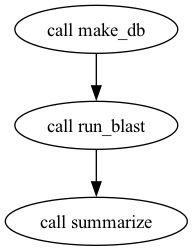
DAG of the blast_example workflow generated by WOMtool + Graphviz.
The DAG is generated entirely from the data dependencies you wrote into the call blocks, no extra annotation required. If the arrows in your DAG don’t match the order you expected, that’s a clue your WDL’s input: wiring isn’t doing what you thought.
Troubleshooting
“Failed to evaluate input ‘X’”: Cromwell rejects an input expression 🔗
Usually means a typo in a call block’s input: line. Cromwell reports the task name and the input name, so start there. The two most frequent causes:
Referring to a task output that doesn’t exist (
call run_blast { input: blast_db = make_db.blastdb }when the actual output name isblast_db_files).Forgetting that task outputs are referenced as
<task>.<output>, not<task>.<input>.
Run miniwdl check blast.wdl first, it catches most of these before Cromwell sees them.
“Cromwell ran the task but my output file is empty / missing” 🔗
The command ran but didn’t produce the file the output block declared. Look at cromwell-executions/<workflow>/<id>/call-<task>/execution/:
stderrshows what the command printed; this is where a missing tool or “file not found” error will surface.scriptis the actual shell script Cromwell generated and ran. If a WDL variable interpolation went wrong, you’ll see it here as the wrong literal value.stdoutis whatever the command printed to stdout. Often empty unless your task echoes things.
A common cause: the command writes to a different filename than the output { File foo = "actualname.txt" } block declares. Cromwell looks for the exact filename you wrote; case and spelling have to match.
runtime { docker: ... } image fails to pull during a JAWS run 🔗
A few things to check:
The image is public on Docker Hub (or in a registry JAWS has credentials for). Private Docker Hub images need to be in an organization JAWS has been given access to, ask in
#jawsif you need that set up.The image tag still exists.
:latestand other moving tags can disappear. If reproducibility matters (it usually does), pin the SHA256 digest as described in Lesson 2’s “Prefer SHA256 Digests Over Tags” section.For JGI GitLab registry images (
library.jgi.doe.gov:5050/...), the image pulls fine but call-caching is disabled for them, see Lesson 2 Step 4.
What’s Next
You now have a working WDL workflow that runs end-to-end inside containers. Next:
Lesson 4: Defining the Input Data, which covers the
inputs.jsonfile in detail, file paths vs. URLs, lists and maps, when to use/fast_scratch, and how JAWS caches your input files between runs.
See also
OpenWDL 1.0 Specification, the authoritative reference for the language.
wdl-tasks, a JGI library of reusable subworkflow tasks you can
importrather than re-write.Best Practices for Creating WDLs, recommended patterns for WDL workflows that scale on JAWS.